SIP Workbench Links
Order Now
Download Now
Online Help
Screen Shots
Version HistoryInterested in a MacOS or Linux version or notification of updates? Join the SIP Workbench announce maling list.
SIP Workbench Mailing ListSIP Workbench, SIP protocol analyzer and viewer:
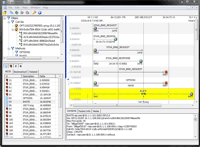
SIP Workbench is a graphical SIP, RTP, STUN, and TURN protocol analyzer and viewer designed to help illustrate and correlate VoIP and IM network interactions. SIP Workbench is a versatile tool designed for protocol developers, system integrators, and end-users to use to visualize, diagnose, and debug complex multi-protocol interactions.
SIP Workbench reads Ethereal/Wiresharp libpcap files and can perform live captures itself. Additionally, it can export SIP, RTP, and STUN information in text-based ladder diagram.
Features and Benefits
Key Features Graphical display of complex interactions Correlates SIP messaging Filters large data sets Decodes STUN and TURN packets Summaries media Operates directly from network capturesBenefitsSaves time Users can quickly review packet interactions, filter on a particular flow, and identify retransmissions, timing inconsistencies, failed requests, dropped responses, and routing issues. These features allow for quicker diagnosis and resolution of problems. Facilitates communications While a troubleshooting a problem, users can export ASCII representations of an interaction, annotate it, and share it with a vendor, system administrator, or developer. Users can export an entire packet capture or a particular flow or the contents of a single message. |
Highlights problems SIP Workbench includes visual indicators representing negative responses, missing responses, media start events, and timing characteristics. Different messages and message types are color coded to highlight and separate potential problems from expected interactions. Learning tool Those unfamiliar with SIP, STUN, TURN and RTP benefit from SIP Workbench's intuitive graphical interface that allows users to visualize interactions and compare message flows. Sample captures are also included. |
Product Overview

Visual DisplaySIP Workbench displays SIP, STUN, TURN and media start events in a color-coded ladder diagram. The diagram identifies the source and target IP addresses and ports, user-agent information, transport types (UDP or TCP), and summary information for the message. SIP markers include the method, response code/text, and sequence numbers; audio markers include the payload type; and STUN/TURN markers include the method type and mapped IP or relay addresses. When selecting a marker, the user is presented with transactional and session markers to help identify related messages. Time duration is provided for the session. CorrelationSIP Workbench maintains the relationship of SIP, STUN/TURN, and audio messages in the presentation of data. This feature allows users to ignore and filter uninteresting messages and and the decoded contents of SIP, STUN, and TURN messages. Network CaptureUsers can open libPCAP network captures created by tcpdump and WireShark. SIP Workbench can also capture packets directly for viewing. UI CustomizationSIP Workbench allows users to customize both how and which data are presented. Users can enable/disable all of the visual correlation features and modify the color coding used to display message categories (i.e., request, provisional response, error response, final response, error response, media markers, and related messages). |
FilteringUsers can filter by a specific SIP method, call-id, and to/from address. From a call-id, SIP Workbench enables further filtering by branch and individual transaction. A message selection window pane assists data filtering by providing a list of all messages available in the diagram and provides the ability to filter on SIP, STUN/TURN, and media categories. BookmarksAny marker can be added to a bookmark list for quick access. These bookmarked markers display the time relative to other bookmarked markers. Export and PrintingSIP Workbench provides the ability to print SIP diagrams and export diagrams to a text file. Text exports include an ASCII ladder diagram along with message details. MediaSIP Workbench provides summary information for audio and video streams. Users can review jitter and bandwidth graphs for each media stream and can extra media with or without RTP headers. RTCP reports are presented in a format that allows users to review information from sender reports, receiver reports, in addition to session description information. |
Technical Specifications
Software Requirments Microsoft XP Professional SP2 OR Microsoft Vista OR Microsoft Windows 2000 Administrative access for installation and packet captures |
Hardware Requirements 1 GHz x86 processor 512 MB of system memory 1 GB of available hard drive space Network card (for network captures) |